
Log In


Forgot your password?

Finding Co-Op Gamers Using Co-Optimus

Editorial
Twitter facebook googlebuzz


One of the truly great things about the advent of online networks like Xbox Live and the PlayStation Network is the ability to play cooperatively not only with your wife or son in the same room, but with your brother or sister across the country.  Sometimes though your co-op partner might not always be available, this is where Co-Optimus.com can help!

The following article will show you how to use the built in tools on the Co-Optimus website to find other gamers playing the same co-op games as yourself - and how you can set up sessions and more with them!


1)  Step 1 - Add a Game

The first thing you'll want to do is navigate to a game's page in our database.  Either browse to it by our games link, systems page, or search and advanced search functionality.

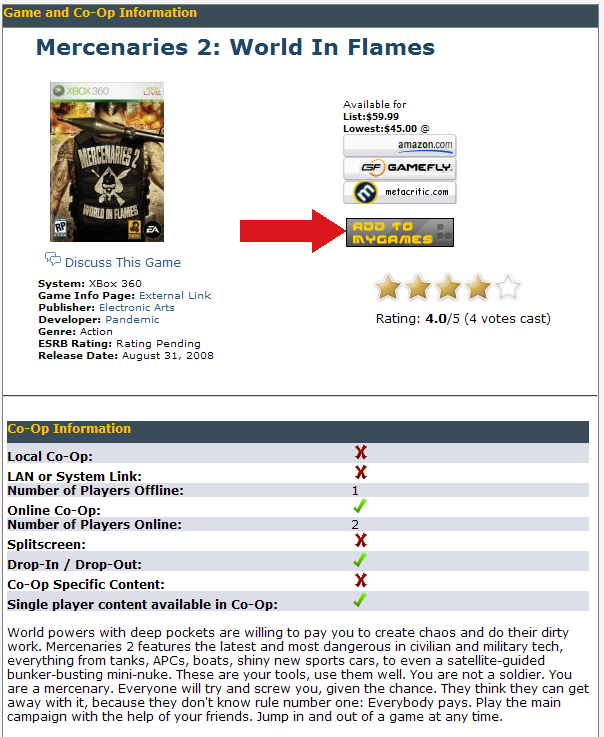
Once you reach the page you'll see a box of information similar to below.  Simply click the "Add to MyGames" button and your game will be added to your queue.
 

2)  Find Gamers by Game

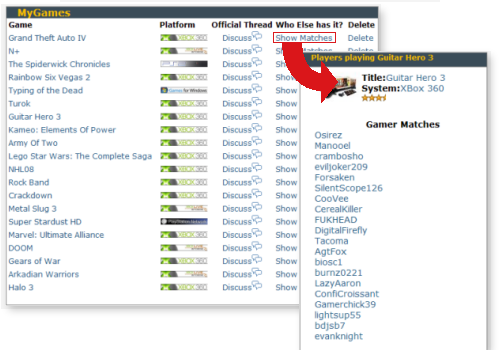
Navigate to the MyGames page to see a list of all the games in your queue.  Want to see who else on Co-Optimus is playing it?  Simply click the "Show matches" link next to the game name. 

This will show you all of the current players, with links to their profile on the forums.  From there you can send them a PM or Create a Meetup Thread in our Meetup Forum!
3)  Find your long lost sibling

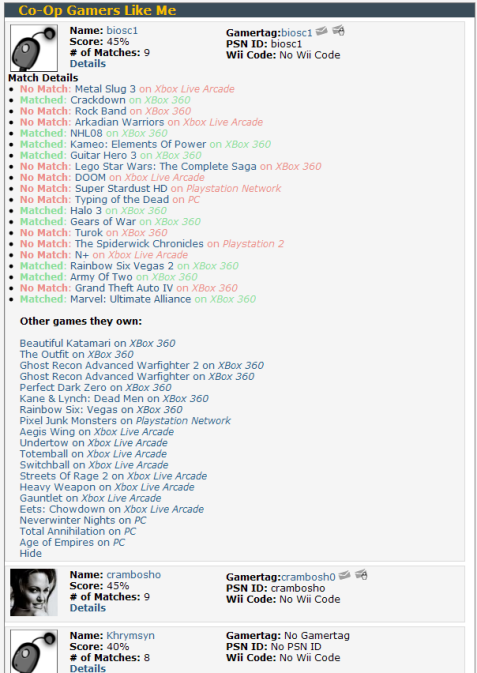
Finally one of the coolest features of the site is the ability to match you to gamers who have the most similar tastes.  Sorted by a magical robotic generated score, the site will choose 10 Co-Optimus members who have the most games in common with yourself. 

It'll show you the matches as well as the games you don't match on.  Perhaps if your tastes are so similar you would like some of the other games they are playing too?
 

4) Play!

And that's it!  It's that simple to make new friends using the built in tools of this website.  Don't forget to delete games you currently don't own anymore from your queue to ensure the matches work the best. 

We'll be bringing you more matching and other tools in the future.  Any comments or questions?  Be sure to let us know!

 
Reads: 5453
 
Author
Nicholas "bapenguin" Puleo
Owner and Managing Editor

Related Stories


Anonymous
10:17 AM
9/16/2008

K. I did the thing.

I think it's a great feature.


wikkidkarma
10:18 AM
9/16/2008

Sweet feature. I added all my co-op games.


txshurricane
11:21 AM
9/16/2008

Never got this deep into the site. Thanks for posting this, it's very helpful!


Mrxknown_JG
11:40 AM
9/16/2008

No one else has Superman 64....wait that doesn't have co-op!

Just added Mercs too. But with school I may be on erratically.


Mrxknown_JG
12:51 PM
9/16/2008

I just realized that while this is great. If I read a post from say SeaHell90210 and I click on his profile link in his post.

Is it possible for his profile to list what games he has or maybe just the games we have in common if any?


bapenguin
1:14 PM
9/16/2008

That's definitely something I have planned. I want to make a more detailed profile page for each user so you can look at anybody's page.

Soon enough!


Mrxknown_JG
2:42 PM
9/16/2008

NOW NOW! I WANT IT NOW!


crambosho
5:44 PM
9/16/2008

Woah!

You're 45% matched with me.


Shazoo
1:01 AM
9/17/2008

sorry, where do I go for the full article and how-to.


Shoot2killya
5:36 PM
12/20/2009

how do I make my profile have a picture?


smurphster
5:51 PM
12/20/2009

--- Replying to Shoot2killya -----
from the forums, go to your user control panel (upper right of page to the right of the ad). click "profile" then "edit avatar" and you can upload or paste a link to an image of your choosing. pay close attention to the limitations mentioned on that page.


blakepro
12:46 PM
12/21/2009

--- Replying to bapenguin -----


You should add this link to the first post in the forums. There is no link there when viewing from the forums rather than the main site.

Login to Comment

Forgot your password?

Register

CoG UserName:
CoG Password:

Login or Register for Co-Optimus to meet other co-op gamers, comment on articles, and create and post your own blog. You can even use your Facebook account to quickly create a Co-Optimus account and login with one click. You may also use your Colony of Gamers account to comment.

Total Comments: 13

INTERESTING ARTICLES AROUND THE WEB