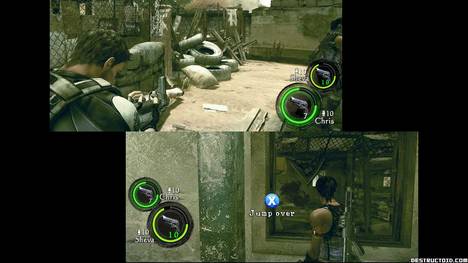
The above screenshot is taken from Resident Evil 5's same box split screen mode. It's a mode that a lot of developers seem to leave out nowadays in co-op play, so it's one we shouldn't take for granted. But the folks over at Destructoid, well lets just say they are throwing a hissy fit about it.
As someone who often games with his significant other, sitting side-by-side on our couch, this was kind of unacceptable. Difficult to see on our "average" 34" high-definition television, it took awhile for each of us to adjust our eyes to the two tiny, individual screens. Items lying around Shanty Town were difficult to spot in the heat of battle, and we'd have to squint to see subtitles. In short, split-screen cooperative play was more frustrating than enjoyable.
They have a point in terms of usability. It also depends on screen size as well. Resident Evil 5 isn't the first game to utilize something like this, in fact, the recently release Call of Duty: World at War utilized the exact same thing.
But lets look at this further.
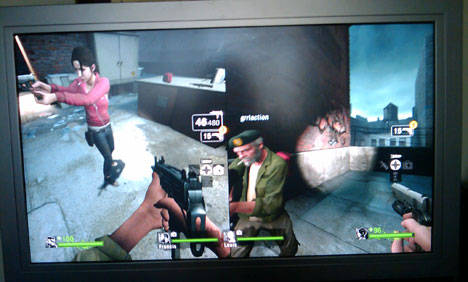
Lets talk about split screen gameplay for a bit. Back in the heyday of split screen on consoles, it was always a horizontal split. Players were garnered with a nice widescreen view of the game action across their 4:3 ratio television. With four players you received four 4:3 ratio screens on your TV. Once widescreen became the standard splitting it horizontally made things look a bit off with a super wide aspect ratio that even made IMAX cry. So instead developers split it vertically creating these pillar box splits (pictured above).
Honestly, I look at that and think it looks like crap. You limit the vision and perspective of the player. It's like playing the game with horse blinders on. Perhaps I've been spoiled by 16:9 ratios, but I'd rather see the full picture, even if the interface is extra tiny. Like we previously mentioned, the Xbox 360 version of Call of Duty World at War displays two widescreen images that "float" on the screen in a picture in picture style display. In a game like that this seems ideal as item text isn't as important as say...survival against the rush of Nazi zombies.
Of course the final solution to all of this is to give players the option of how they want their screen split. Left 4 Dead actually allows you to choose either horizontal or vertical split. So bravo goes to the developers there. We know we are probably looking a gift horse in the mouth here, and we should be happy enough with just getting ANY kind of split screen co-op play.
So which way do you prefer your screen split?
Thanks rafoca for the tip!
Source: Co-optimus.com